
• Skip to primary navigation
  • Skip to main content
Clear Sight Books

Clear Sight Books

Your message. In focus.

  • Home
  • Services
    • Manuscript Critique
    • Writing & Editing
    • Professional Publishing
  • Authors & Books
    • Testimonials
  • Meet the Team
  • Blog
  • Contact
  • Show Search
Hide Search

Word Tip: Finding Your Word Count

Karin Wiberg · November 19, 2020 ·

image of measuring tape

Knowing your word count can help you set guideposts to keep on track, identify areas for potential revision, and create a better reading experience for your audience.

In MS Word, to find your word count, from the Review menu, choose the Word Count button.
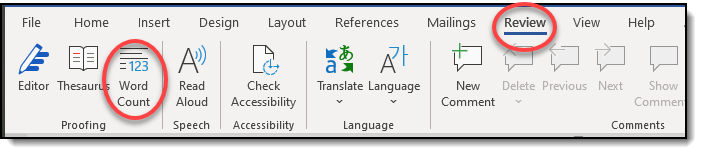
image of Word's tool bar and menus

You’ll see a pop-up box with your document’s statistics.
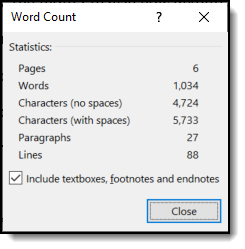
image of Word's Word Count display

If you select just a portion of your text (say, a chapter) and then select Word Count, you’ll get the word count just for the selected portion.

Google Docs has a similar feature: choose Tools, Word count.

Technology

Clear Sight Books

Copyright © 2026 · Monochrome Pro on Genesis Framework · WordPress · Log in